NEWS
November 10: Release Notes
Updates to Broker Tour Search and Reports and other recent updates.
The following items were released November 10:
Updates to Broker Tour Search and Reports.
To help make it easier to search for, sort, and present Broker Tour information in Bright, we made several updates to the Broker Tours Search that includes a new Single Line report format. Learn more here.
Brokers can now assign staff as an Office Manager from Bright’s Account & Settings.
To help make it easier for you to assign staff as an Office Manager in Bright, you can now add and modify individuals to have this role directly from Account & Settings. Learn how here.
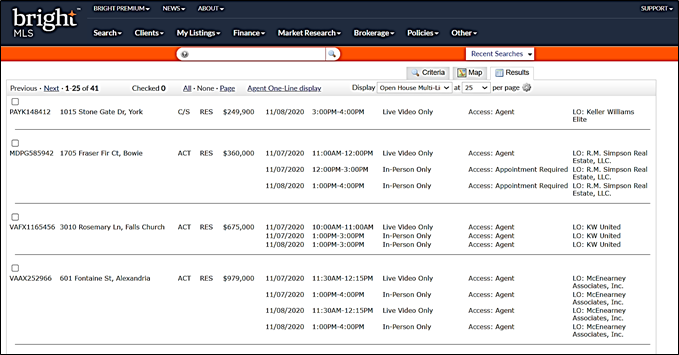
“Open House Multi-Line” display view and report option added for Public Open House Searches.
A new display view and report option titled “Open House Multi-Line” is now available for you to share and print out a list of Public Open House information. This report will include the following information:
- MLS #
- Address
- Listing Status
- Property Type
- Price
- Date and Time of the Open House
- Open House Type (In-Person Only, In-Person and Live Video, Live Video Only)
- Access Type (Agent, Appointment Required, etc.)
- Listing Office
Please note: For optimal viewing, it’s recommended to print this report in a landscape layout.
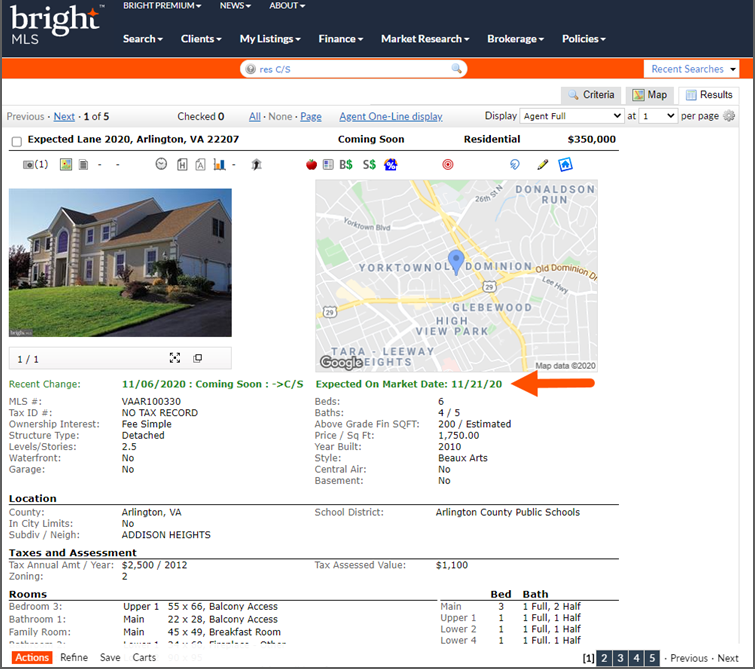
Improved visibility of Expected On Market Date for Coming Soon listings.
To help make it easier to determine when a Coming Soon listing in Bright is scheduled to go Active, the “Expected On Market Date” will now display next to the Recent Change and Status fields for Residential Sale Coming Soon listings on the Agent/Client Full, Synopsis, and One-Page reports.