
NEWS
For Brokers: Welcome Back page now available for anyone with inactive subscriptions
Now, if anyone in your office has an inactive subscription, they can easily reactivate their account, review and pay any remaining balance owed all-in-one place from our new Welcome Back page.
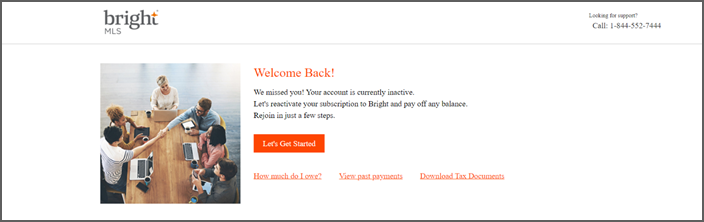
Here is how the new Welcome Back page works:
- When anyone with an inactive subscription from your office attempts to log into Bright using their old login credentials, they will automatically be redirected to this page.
- They can click Let’s Get Started to submit an online reinstatement application.
- Click on “How much do I owe?” to pay any remaining balance.
- Select View past payments to review their MLS Statement of Account and any past invoices, payments, or credits.
- Access a link to Download Tax Documents.
To learn more about Bright’s Login process for new and returning subscribers, visit this article.
Back to Top