
CubiCasa’s digital GLA reports offer real estate appraisers a convenient, detailed, and reliable way to get the job done right.
NEWS
New Bright Search Updates Enhance Results Statistics Reports
Explore the latest updates designed to make it easier to compare key property details at a glance.
This week marks the release of two additions to the Results Statistics report available through Bright Search. Here’s a quick overview of the new enhancements.
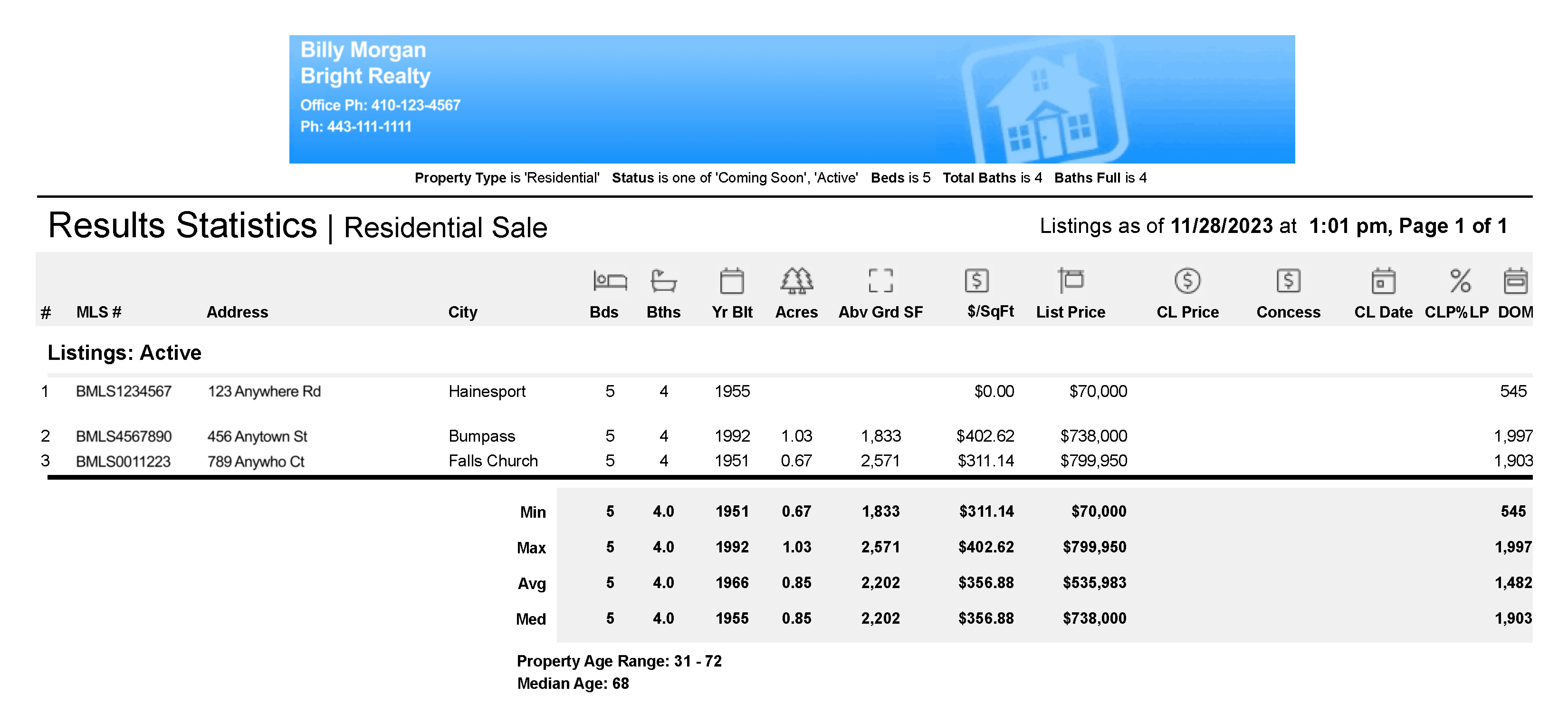
Property Age Range & Median Age
To better assist you when you want to quickly compare key property details and pricing information on similar listings in a particular area, the Results Statistics report now includes the Property Age Range and Median Age for the listings you’ve selected from your search results.
- Property Age Range – This field will display the listings/properties included in the search results from lowest age to highest age.
- Median Age – This field will display the median age of the listings/properties included in the selected search results.
Note: These fields will not display for Residential Lease and Land property type searches.
How to Get a Result Statistics Report in Bright Search
- From your search results, check/select the listings you want to compare.
- Click the Results Stats link located on the orange action bar located at the bottom of your Appraiser, Agent, or Client One-Line display.
- This will produce a Results Statistics report in PDF format.
Keep on Top of Comps
The Results Statistics report is just one of the many Bright tools that help you work smarter! Attend an upcoming webinar and get the inside scoop on creating and working with comps.
SIGN UP |
Recent articles
Back to Top