
Don’t just meet your clients’ needs—exceed their expectations. These four simple tips can help boost your reputation for providing excellent client service.
NEWS
Create Clients for Life
Nestfully puts you right where you want to be—at the center of your clients’ home journeys.
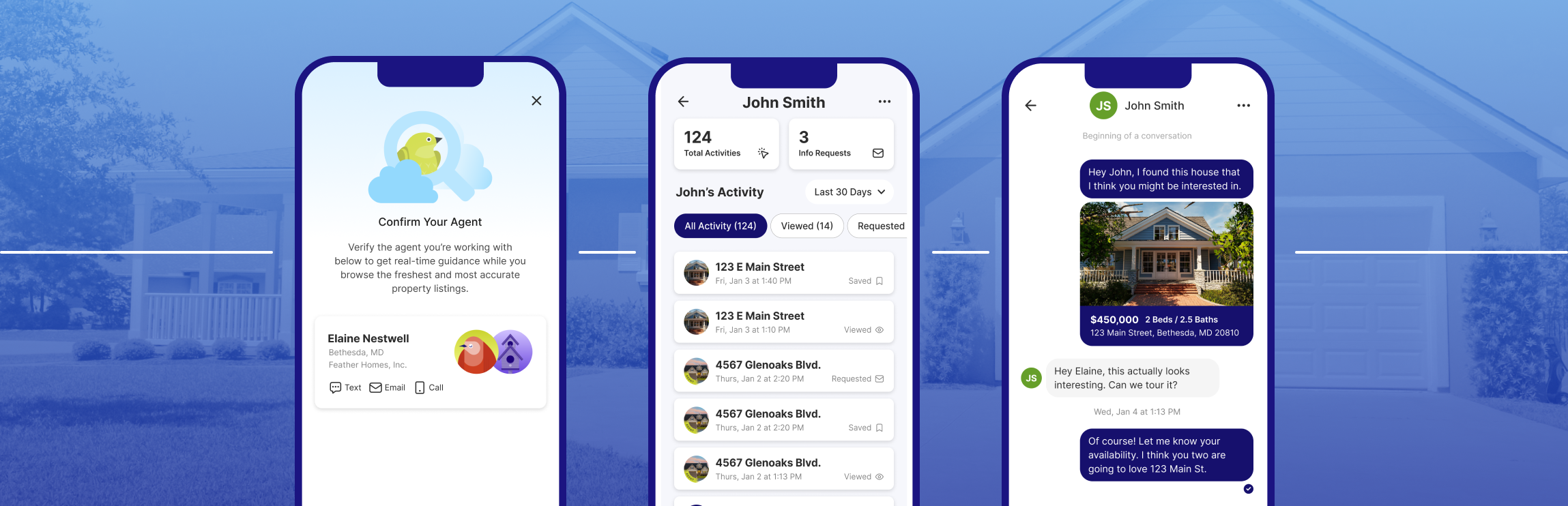
Prospective buyers often begin their home search quietly, just clicking around online to see what’s out there. It starts as a solo mission—but it won’t stay that way for long, if they’re connected to you in the Nestfully app.
Nestfully sets you up for success
Establishing lifelong client connections means guiding first-timers through their starter home purchase, helping them upsize to accommodate a growing family, or working with them to find the perfect place to enjoy their golden years. Nestfully was built to help you build and cultivate these priceless relationships. Here’s how:
-
Your information is front and center. Every time your connected clients open the Nestfully app, your name and contact information is right there to greet them. That means that when these hopeful buyers are ready to discuss their options, schedule a showing, or ask some questions before taking the plunge, you’ll get the call.
-
Stay in sync with client tracking functionality. You’ll never miss a beat when you can see exactly what listings your clients are looking at and homes they’re saving. Plus, any showing requests will come directly to you!
-
Keep the lines of communication open. Nestfully’s collaboration-forward features let you stay closely connected to your clients at every step of their home search. Share messages back and forth in the app, get feedback on listings you suggest to them, and answer their questions along the way. With a real estate experience this seamless, why would they ever look to another agent?
Connecting is as easy as 1, 2, 3!
Ready to connect with your clients in the Nestfully app? Make sure you’re logged in as an agent, and then follow these steps:
-
Look for Leads at the bottom of the screen. Click the people plus icon.
-
Select whether you want to give Nestfully access to all or some of your contacts.
-
Select the contacts you want to invite and click Invite Contact at the bottom of the screen.
You can either select contacts from your phone or manually enter their info directly in the app to generate an automatic text or email with a link to connect with you.
Start Building Stronger Client Connections Now
With even more fantastic Nestfully app features in the works, you’re going to want to jump in now!
Recent articles
Everyone wins when you team up with your clients in this MLS-powered collaboration app. Here’s how to get started.
Back to Top