
Make sure your listings always reflect the accurate status for your records and for everyone in the Bright community who relies on this information.
NEWS
Now available: Compliance reminders when entering a listing
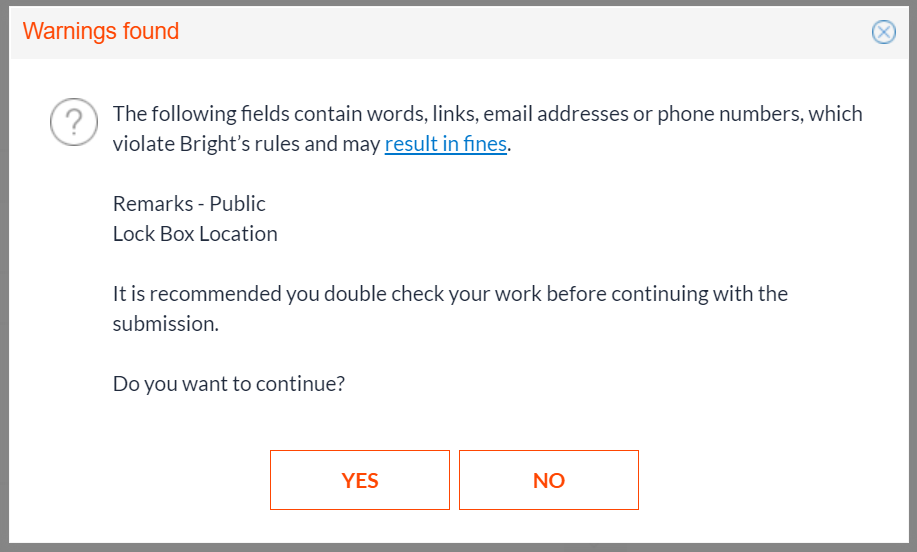
To help you avoid preventable fines and ensure listings follow Bright’s rules, new reminders will appear when external links and contact information are entered in public-facing remarks during the listing entry process.
Did you know that including links, phone numbers, and/or email addresses for personal branding within a listing’s public remarks is one of the top three compliance violations every month? To help you identify these before a listing is published and minimize the risk of any associated fines, new reminders will now display when entering a listing in Listing Management.

Compliance reminders will now appear in Listing Management
When entering a listing in Bright, website links, email addresses, and phone numbers are only allowed in Agent and Office Remarks.
To reduce the occurrence of these violations and help you avoid any potential fines, you will now receive a warning when any of the following information is entered in fields other than Agent and Office Remarks:
- Phone numbers
- Email addresses
- Anything ending in a URL, such as .com, .net, .org, .realtor
If you feel this information would be useful for prospective buyers, add the information to Agent and/or Office Remarks and encourage the agent to share with their clients.
Additional resources
Learn more at BrightMLS.com/Rules
This update is another way Bright is working to share policy and rules information when you need it to help keep your listings in compliance. Get the latest at BrightMLS.com/Rules.
Recent articles
Back to Top