
Here’s your sneak peek at the latest updates released to the MLS-Touch mobile app.
NEWS
Recent Update to Your MLS-Touch Login
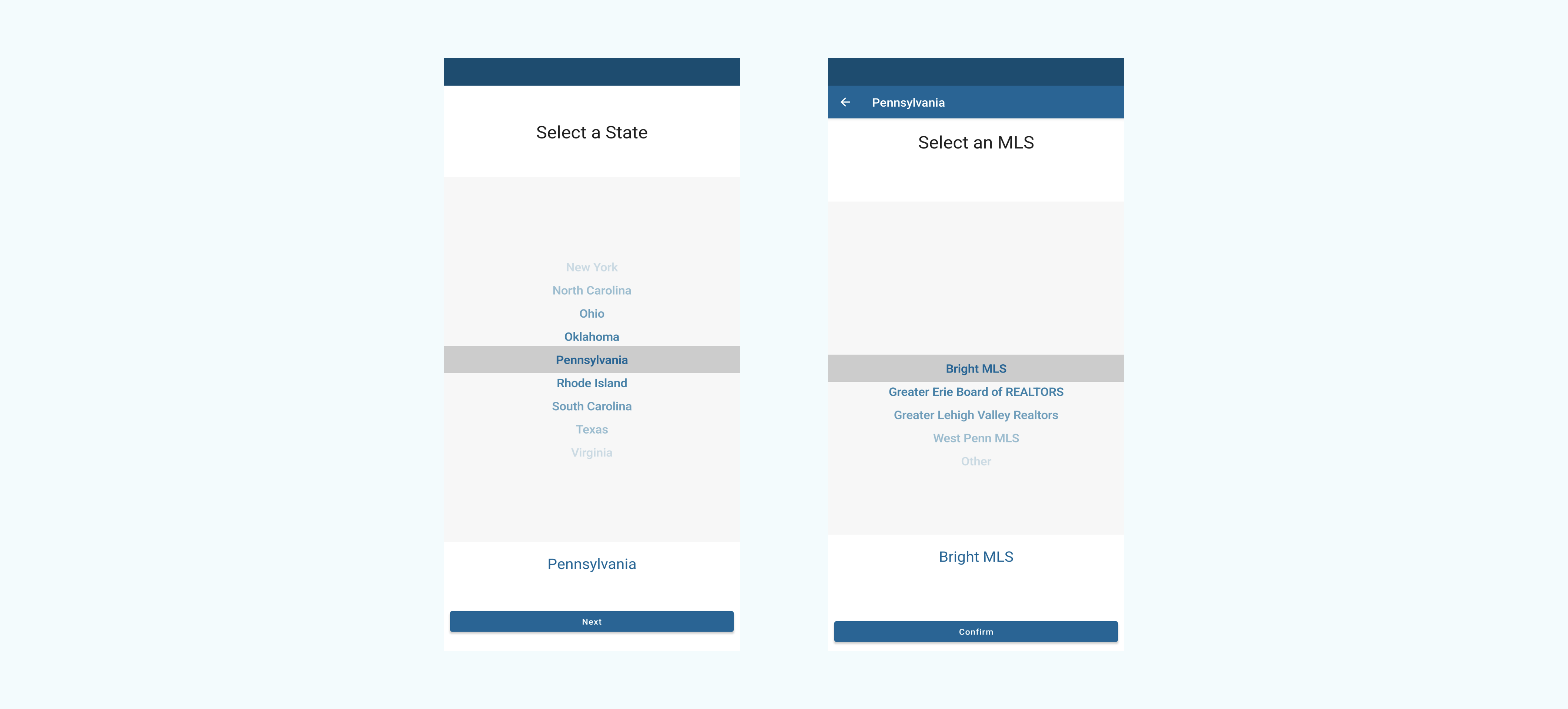
When logging in to the app, users are now able to select their specific state from a list of all states in the Bright service area.
The MLS-Touch app recently updated its login/reauthentication process, requiring you to select your state from a list of all states in the Bright service area. For current MLS-Touch users, this will apply when you’re prompted to reauthenticate in the app every 30 days.
Updated Login Steps
Follow these steps to log in to the app:
1. Open the MLS-Touch app
2. Select your state (or Washington, D.C.) from the dropdown menu
3. Select Bright MLS as your MLS
4. Log in with your Bright credentials
Please note: Regardless of the state you select, you will see listings from the entire Bright market, not just the state selected.
What Prompted This Update?
This change comes as a direct result of feedback from our subscribers. We received a number of comments indicating that MLS-Touch users wanted an option to log in to the app with their specific state instead of selecting Bright Area from the dropdown menu. The update satisfies this request while also making the login process more intuitive for new users.
Need an MLS-Touch Refresher?
The MLS-Touch app is a valuable extension of your Bright Search experience. If you’re looking to get the most out of this comprehensive mobile app, sign up for a webinar or select one of our on-demand training options created to work with your busy schedule.
VIEW TRAINING OPTIONS |
Download now!


Recent articles
Discover the convenience and functionality of MLS-Touch, the comprehensive mobile app designed to take your business anywhere.
Back to Top