
NEWS
July 23: Release Notes
The following items were released July 23:
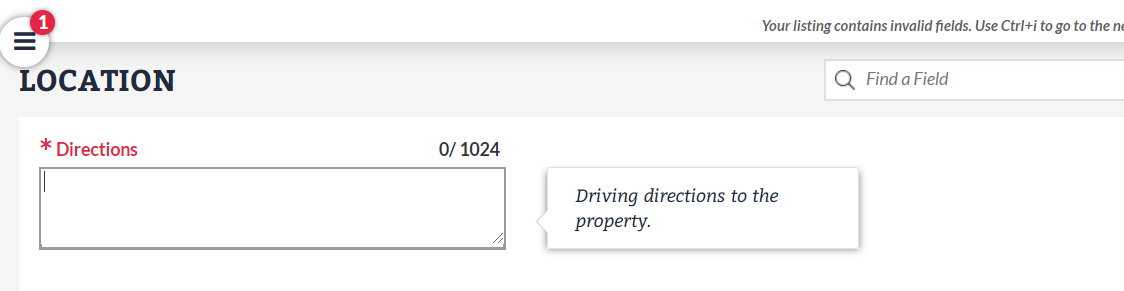
Directions field now required on all listings.
Based on subscriber feedback, Directions is now a required field for all property types in Bright. This change was made to ensure more detailed instructions are available for listings that are located in new communities, gated communities, and in some remote areas.
Please note: You will need to add this information to any new listings or on-market listings you are editing in order to publish the listing. Learn more here.
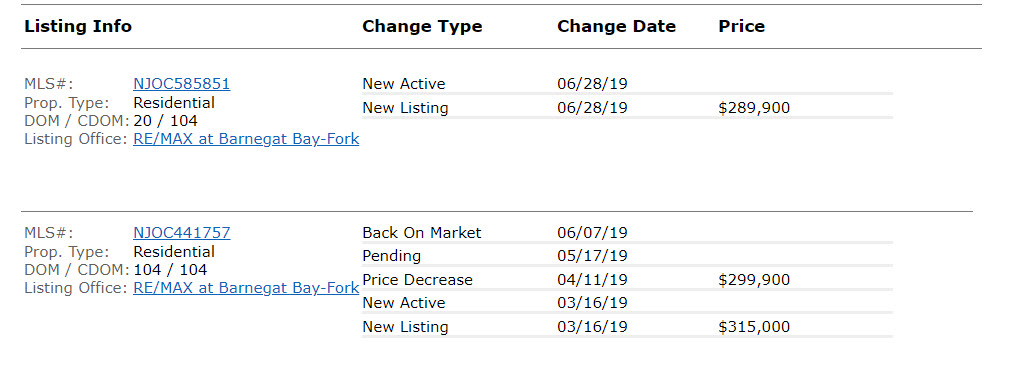
Listing history will now include a listing’s original status when entered.
When a listing is published, you will now see both a “New Listing” record and a record that indicates what the listing’s status was when it was first entered (e.g., “New Active”) in its listing history. This update will ensure that we accurately capture the status in which a listing is published. Learn more about this update and its effect on Market Watch and Hot Sheets.
System fixes and other enhancements for improved photo uploads.
Improvements were made to the photo upload process, including warning messages will now display for images that cannot be uploaded due to compatibility issues such as invalid file format, dimensions, etc.
Updates to improve searches and data within the Residential Lease property type.
- The Contingency Type and Last Contingency Expires fields are being removed and will no longer be visible when entering a Residential Lease listing in Listing Management. On-market Residential Lease listings will be updated to remove these values over the next several days.
- Contingency Type and Last Contingency Expires will be removed from all Residential Lease reports and displays.
- Signed Lease Date is now optional for Residential Lease listings in the Active Under Contract or Pending status. (Please note, this field is still required if Status = Closed.)
The following fixes were made to the Financial Calculators.
- When loading a saved Buyer Closing Cost with a Cash loan type, Mortgage Recording fee no longer displays on the report.
- On the Buyer Closing Cost, help text has been added beneath the Association Monthly Payment field to clarify this amount is not being added to the Other Closing Costs total.
- You can now overwrite an existing Seller Net Sheet and save it using the same name.
- The process of finding the correct address for a listing not attached to a parcel has been improved to better autofill information on the Buyer Closing Cost.
- You can now save a Seller Net Sheet with additional fees containing 0-2 decimals successfully.
- The additional proration fields on the Seller Net Sheet have been updated to adhere to the date rules of the standard proration fields: “From” dates must be today or in the past, and “To” dates must be today or in the future.
- On the Seller Net Sheet, Condo/HOA fees are no longer retained once they are removed.
- On the Buyer Closing Cost, additional reimbursement fields have been updated to adhere to the same rules of the standard reimbursement fields: no invalid/unlimited characters, past dates, or incorrect total month calculations.