
NEWS
June 6: Release Notes
The following items were released June 6:
New fields and picklist options for Commercial property types, and other updates to Listing Management.
As we continue to refine the Commercial Sale, Commercial Lease, and Business Opportunity property types in Bright, several updates have been made to the fields and picklist options that are available to you. Based on subscriber feedback, we’ve added:
- 4 new required fields
- 4 new optional fields
- 19 new picklist options
If you have an active listing in any of these property types, we strongly suggest reviewing and making any necessary edits based on the new information that’s now available. Read the full list of the new options here.
In addition to these changes, the following updates were made:
- “No Pet Restrictions” has been added to the list of options in the Pet Restrictions field in Residential Sale and Residential Lease property types. When this option is selected, you will not be able to select any other options from the Pet Restrictions picklist.
- When you enter a listing in Sussex County, Delaware and choose In City Limits = Yes, the City Taxes you add to the listing will be automatically added to the Total Annual Taxes. All existing listings will be updated based on this change.
Updates to the Market Statistics Report.
We updated the Market Statistics Report page to look and work the same as the Market Performance Report, Listing Performance Report, and Residential Activity Report. All of these now share the same components, so that their search options are consistent across all of Bright’s statistical reports. Notable updates include:
- Geographic search now functions as a one-line search to match the other statistical reports, much like any listing search. This will enable you to have a consistent searching experience across the Bright system.

- The Price search was updated to match the way price searches work in other statistical reports.
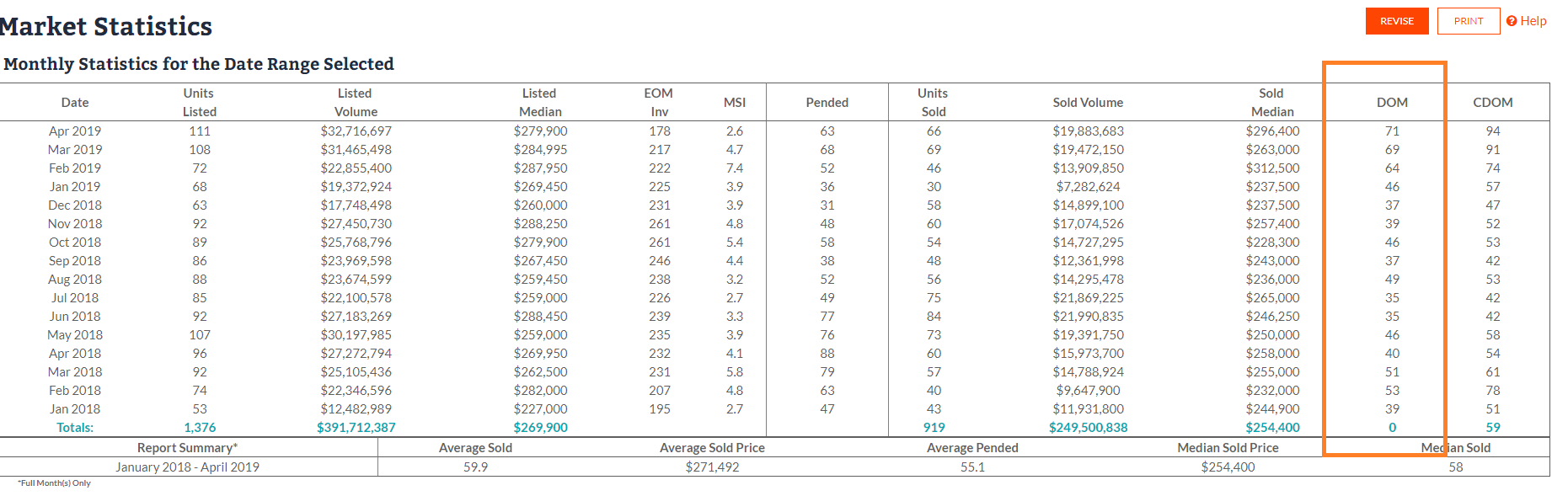
- Previously, only CDOM was included on the report page. We added DOM values to this page, since DOM is also used for these statistics.
The following fixes were made to the Financial Calculators:
- When creating a Buyer Closing Cost, Loan Type = Cash no longer generates a Preview error for municipalities in Virginia.
- When saving a Seller Net Sheet, any Seller Assist amount entered is now retained on the report.
- When sending a Seller Net Sheet report through email, the contact information of the current user now displays correctly in the header.
CMA reports have been updated in Search to display List Price, Closed Price (instead of Sold Price), and Concessions Amount on all pages.
We enhanced the accuracy of our CMAs by updating the information provided on all report pages. Now, all the report pages in Search have been updated to show List Price, Closed Price, and Concessions Amount fields.